Showing posts with label Lambda Expression. Show all posts

Monday, November 9, 2015

Reference Types, Value Types, and Equality

In many places, we don't need to worry about the difference between value types and reference types. But one place we do see a difference is how equality is handled by default. I've had a couple of questions and comments about this recently, so let's take a closer look.

The Question
The questions came from my video series on Lambdas and LINQ (video playlist). There's also a print article available for download here: Learn to Love Lambdas (and LINQ, Too!).

Here's the code we're looking at:


This code refreshes the data in a list box by calling into a library that uses the Event Asynchronous Pattern (EAP). There's a particular piece of functionality we care about:
  1. Before refreshing the list box, we save off a copy of the currently selected item.
  2. After refreshing the list box, we try to set the selected item based on our saved value.
At the top of the method, we save off the selected item:


And then inside our lambda expression, we try to set the selected item in the list box:

Set Selected Item in List Box
The object that we have here (the "Person" class) does not have a primary key, so we compare the first name and last name properties -- this definitely isn't ideal, but it works for our small data set.

With this code in place, the selection will be saved between refreshes. So, if we run the application and select an item (Isaac Gampu), our screen looks like this:

Initial Selection - Isaac Gampu
(Notice the selection in the top left corner). Then when we change the sorting and click the "Refresh" button, we see that Isaac Gampu is still selected:

Isaac Gampu still selected after refresh
For more details on how the lambda expressions and LINQ methods work, be sure to check out the associated resources: Learn to Love Lambdas (and LINQ, Too!).

And this brings us to the question:
Why can't we just set the selected item directly based on our saved person?
The proposal is to replace the code above ("Set selected item in list box") with the following:


This makes our method much simpler:


This looks great (and sounds a lot easier). But unfortunately, it doesn't work. Here's what happens. First, we make an initial selection (John Sheridan):

Initial Selection - John Sheridan
Then when we click "Refresh", we lose our selection:

No selection after Refresh
Why does this happen? For this we'll need to take a closer look at the difference between reference types and value types.

Reference Types, Value Types, and Equality
The difference between reference types and value types is how they are stored in memory. There are 2 memory locations we need to worry about: the stack and the heap.

I won't go into a full explanation of the stack and heap. You can get a good overview here: C# Heap(ing) and Stack(ing) in C#.

What's important to understand here is how equality is handled differently with reference types and value types.

Value Type Equality
Since value types are stored on the stack, equality is determined by comparing the values. This makes it easy to compare ints, bools, and chars. A struct is also a value type. Since a struct generally has multiple sub-values, equality is determined by comparing the values of each field and/or property.

Reference Type Equality
Since reference types are stored on the heap, equality is determined by looking at the pointer. If 2 objects point to the same object in memory, then they are considered to be equal. This means that they are only equal if they point to the same instance in memory.

But if we have 2 separate instances, then they will not be equal (at least with the default implementation; we'll look at another solution in just a bit).

Classes are reference types, so we end up running into this behavior quite a bit. Our "Person" is a class:


Observed Behavior
So why do we have a problem with our proposed code?


When we assign a value to the "SelectedItem" property of our list box, it looks through the items in the list to try to find one that is equal.

When we save off our "selectedPerson" object, we have an instance of the Person class (that holds "John Sheridan" in our example). When we reload our list box, we have a new collection of Person objects. One of those items has a value of "John Sheridan", but this is a different instance from the one that we saved off.

Because we have 2 different instances (the saved one and the one in the list), these are not considered to be equal. And that's why we get the observed behavior (no selection) instead of the expected behavior.

Now let's look at two solutions that will get our proposed code to work.

Option 1: Change Person to a Value Type
One option is to change the "Person" object from a reference type to a value type. In our case, this would involve changing it from a "class" to a "struct". The "Person" declaration is close to the same:


But because we just changed this to a value type, some of our other code breaks. Here's the updated code where we save off a copy of the selected item:


Since our "Person" is now a non-nullable value type, we need to treat it a little differently. The "as" operator only works with reference types since it can result in a null. So instead, we initialize "selectedPerson" to an empty "Person" object, then we make sure that the list box actually has a selected item. If it does, then we cast it to a "Person" and assign it to our variable.

The rest of the code stays the same. Here's our updated method:


And our behavior is as expected. If we run our application and select an item (Dave Lister):

Initial Selection - Dave Lister
And the click "Refresh", we see that our selected item is set appropriately:

Dave Lister still selected after Refresh
Because we're dealing with value types, the comparison is done by looking at the values of the properties: first name, last name, start date, and rating. If these values all match, then the items are considered by be equal.

So we've seen how we can change our data object to a value type, and our proposed code works as expected. But what if we want to keep our "Person" as a class? There's an option for that, too.

Option 2: Override Equals()
Our second option is to keep "Person" as a class (a reference type). The default behavior of "Equals" is what we saw above -- it only returns true if we're comparing the same instance. But we can override the default behavior with something that is more appropriate to our situation. Here's the code for that:


Notice that we have a "class" here. Then we override the "Equals()" method. First we cast our parameter to a "Person". When we use the "as" operator, we will get a null if the cast fails. Next we check for a "null". This could be because another object type was passed in or a null parameter was passed in. If either of these is true, then we return false (meaning, not equal).

Finally, we set up our own equality comparison based on the key properties: first name, last name, and start date. (I didn't include the rating since that could be changeable.)

Then we can go back to our original proposed method:


If we run this code, we see that it works as expected. We can select an item (John Crichton):

Initial Selection - John Crichton

And then after "Refresh", the item is still selected:

John Crichton still selected after Refresh
It would be nice if we could stop here, but things aren't quite so simple. If you notice in our "Person" class, we have a green squiggly. This tells us that there's a warning. We can see this in our build results:


This tells us that whenever we override "Equals()", we should also override "GetHashCode()". The hash code is used when we use this class as a key in a Dictionary. There are rules about creating hash codes that become important depending on how we're using the object. You can get more information on this here: MSDN Object.GetHashCode() Method.

Another thing that we should do when we override "Equals()" is to provide a generic version for our specific type: "Equals<Person>(Person obj)". But we won't do that today either.

As we can see, once we start going down the path of changing how equality works with an object, we have quite a bit of work to do.

Original Code
One of the questions that I received on the original code:
Why didn't you just override the Equals method?
There are a couple of reasons for this. The first reason is that we lose the lambda expressions and LINQ methods that I wanted to demonstrate here ☺.

But the bigger reason is that we don't always have the option of changing our data objects. Even when we're constrained by our data, we can use LINQ to query it, filter it, sort it, and even easily locate items in a list.

Wrap Up
We don't usually have to worry about the difference between reference types and value types. But as we've seen, there is a big difference between them when we start to talk about equality comparisons. As usual, there are several different ways that we can approach the problem. And that's good. When we have options, we are free to select whichever one works best for our particular situation.

Happy Coding!

Saturday, April 25, 2015

New Video: Deciphering the LINQ Join Method

I really love using the fluent syntax with LINQ. This gives me full access to all of the very useful extension methods.

In Part 2 of the Lambdas & LINQ video series, we took some time to understand the parameters of the Where method and also OrderBy. After seeing this, folks sometimes ask me: "What about Join?"

And why do they ask this question? Because this is the method signature:


Yikes.

But when we break things down, it's nothing that we haven't seen before. And that's exactly what we do in my latest video: Deciphering the Join Method.


If you'd rather have a text version, check out this article: The LINQ Join Method: Deciphering the Parameters.

And find the other videos, links to code on GitHub, PDF walkthroughs, and other articles here: Learn to Love Lambdas (and LINQ, Too)

I'm looking to produce other videos based on my articles (so that different folks can learn in the way that works best for them). If you have a favorite topics that you'd like to see put into video, let me know.

Happy Coding!

Monday, April 20, 2015

New Video: Captured Variables & for Loops

Captured variables are a really cool feature of lambda expressions. But it can also be dangerous if we try to capture the indexer of a "for" loop.

In my latest video, we take a look at the problem that we run into when we try to capture an indexer. And we'll also see how easy it is to get around the problem. There's just one thing we need to keep in mind:
The value of a captured variable is the value at the time it is used, not the value at the time it is captured.
And if you need a reminder of what captured variables are, be sure to check out Part 1 of the Lambdas & LINQ series: Lambda Expression Basics.

If you'd rather read about this problem (and solution), check out this article: Lambda Expressions, Captured Variables, and for Loops: A Dangerous Combination.

Otherwise, watch it here (or on YouTube):


There's also a playlist to watch all of the videos in the series: Lambda Expressions and LINQ in C#.

For more links, articles, and to find the code on GitHub, check out Learn to Love Lambdas (and LINQ, Too) on my website.

Let me know if you like the videos. If so, there will be lots more coming. But don't worry, the articles will keep coming as well. Some people like text, and some people like video. I'm glad to provide both where I can.

Happy Coding!

Tuesday, April 14, 2015

New Video: Declarative Programming with LINQ

I just published Part 3 of my video series on Lambda Expressions & LINQ in C#. This time around, we look at the difference between imperative programming and declarative programming.

Imperative Programming is what we're used to: we tell the computer *how* to do something. This usually involves giving step-by-step instructions such as looping through data, using "if" statements to make comparisons, and then doing the pieces of work that are important to our task.

Declarative Programming is a bit different: we tell the computer *what* we want done. Then we leave it up to the computer (or library) to figure out the rest. It turns out that we can use LINQ methods to make our code more declarative. And in doing this, we make our code easier to read and understand.

So be sure to check out Declarative Programming with LINQ:


This completes the basics of lambda expressions and LINQ. All of the videos are collected in this playlist:

Playlist: Lambda Expressions & LINQ in C#
I have a couple of bonus episodes planned (to cover some more details on captured variables and the Join method). So be sure to stay tuned for future episodes.

Happy Coding!

Monday, April 13, 2015

Talk with Dustin Davis on //c0deporn

I had a chat last week with Dustin Davis (@PrgrmrsUnlmtd) about one of my favorite topics: Lambda Expressions.

You can watch the video on YouTube: Getting Started with Lambda Expressions with Jeremy Clark


If you want to have a chat about technology, just drop me a line.

Happy Coding!


Sunday, April 12, 2015

New Video: Demystifying LINQ Methods

I just published Part 2 of my video series on Lambda Expressions and LINQ. You may have heard about Part 1 (Lambda Expression Basics) on This Week on Channel 9 (big thanks to Channel 9 for the mention).

A big problem with LINQ is the apparent chaos of the method signatures:


When we see this for the first time, it seems extremely complex. But once we dive into the different pieces, we see that things aren't as complicated as they seem. And that's exactly what we do in this video: Demystifying LINQ Methods:


While exploring LINQ, we mention a couple of other topics that are covered in separate videos:
As a reminder, Part 1 covers the basics of lambda expressions. And in future videos, we'll look at how LINQ can help us make our code more readable through declarative programming. We'll also take a look at the Join method and the intricacies of using captured variables in "for" loops.

Get links to all of the videos, plus code samples, additional articles, and a PDF walkthrough here: Learn to Love Lambdas (and LINQ, Too!)

Happy Coding!

Monday, April 6, 2015

New Video: Lambda Expression Basics

I just started a new video series based on my presentation Learn to Love Lambdas (and LINQ, Too!). LINQ is one of my favorite tools in C#, and lambda expressions play a key role in using LINQ methods.

Lambdas & LINQ in C# - Part 1: Lambda Expression Basics
In part 1 of the series, we take a look at the syntax of lambda expressions and how to create anonymous delegates. In addition, we look at captured variables which allows us to scope our variables more appropriately.

Watch Part 1 on YouTube (or here):


Future episodes will take a look at how to read and understand the signatures of LINQ methods. This allows us to use LINQ effectively in our code.

Coming Soon!
Part 2: Demystifying LINQ Methods -- 04/12/2015: NOW AVAILABLE!
Part 3: Declarative Programming with LINQ -- 04/14/2015: NOW AVAILABLE!
Plus, bonus episodes that look at the Join method syntax and the dangers of using captured variables with "for" loops.

Lots of good information coming. If you can't wait for the information, be sure to check out the PDF walkthroughs and articles available here: Learn to Love Lambdas (and LINQ, Too!).

Happy Coding!

Sunday, March 29, 2015

Named Delegates Compared to Anonymous Delegates

I love to talk about lambda expressions because they are useful in a lot of situations (especially when using LINQ). Lambda expressions are just anonymous delegates. So the question comes up, What are the differences between named delegates and anonymous delegates?

For an overview of delegates in general, check out "Get Func<>-y: Delegates in .NET" (including a video series). For some more specifics on lambda expressions and anonymous delegates, take a look at "Learn to Love Lambdas (and LINQ, Too)".

There are 4 differences that we'll look at: captured variables, removing assignments, re-use, and visibility.

[Update 3/30: When I originally published this article, I left out re-use and visibility. Since these are so important, I amended this article rather than writing a new one. That's what I get for writing an article when I've had a long day.]

Captured Variables
Advantage: Anonymous Delegates
Anonymous delegates (and therefore lambda expressions) allow us to "capture" a variable that is currently in scope when we assign the delegate. Then we can later use that variable even when it would have normally gone out of scope.

Here's an example (from "Learn to Love Lambdas (and LINQ, Too)" -- check Page 8 of the PDF:


In this scenario, we have a method-level variable called "selectedPerson". This holds the currently selected item from a list box in the UI.

Then inside our lambda expression, we use that "selectedPerson" variable in order to locate a matching item in the list box after we load in fresh data.

The cool part of this is that the body of the lambda expression does not run until *after* the containing method (RefreshButton_Click) has completed. As such, the "selectedPerson" variable would normally go out of scope and be eligible for garbage collection.

But since our lambda expression captured this variable, it is not garbage collected, and it remains available for our anonymous delegate to make use of it. The big advantage to doing this is that we can have a method-level variable in this case. If we had a separate named delegate, then we would need to promote this to a class-level variable so that both methods have access to it. This allows us to scope our variables more appropriately.

Even though we use a lambda expression in our example, this works with other anonymous delegates as well. Other languages refer to this as a "closure". For a little more info on captured variables, check out this article: Lambda Expressions, Captured Variables, and For Loops: A Dangerous Combination.

So captured variables is a big advantage to using anonymous delegates.

Removing Assignments
Advantage: Named Delegates
All delegates are multicast delegates. This means that we can assign multiple methods to a single delegate variable. Then when we invoke the delegate (that is, execute the methods associated with the delegate), all of those methods run.

For an example of multicast delegates, take a look at "Get Func<>-y: Delegates in .NET" or check out the 3rd video in the series: Action<> & Multicast Delegates.

Just like we can add multiple methods, we can also remove those methods (at least when we're using a named delegate). Let's look at some code to see an example of this.

The Base Application
Here's a sample application where we can see the assignment differences:


In this application, we have buttons to add and remove named and anonymous delegates. The numbers will keep a running total of adding and removing. Then when we click the "Click Me!" button, the assigned delegates will execute.

You can get this code from GitHub: jeremybytes/delegates-and-func. This project is in the "BONUS-NamedVsAnonymous" folder of the solution.

The Constructor
Here are the basics of the code-behind for this form:


This is pretty straight-forward. We have 2 private fields to hold our running totals. Then in the constructor, we assign a lambda expression to our "Click" event to clear our output list in the UI.

As a reminder, event handlers are just special kinds of delegates. This means that they have all the properties that we expect with delegates -- including multicasting.

Named Delegates
Here's the code to handle our named delegate buttons:


First, notice our method "NamedDelegate". This method signature matches the event handler for a button: it takes an object and RoutedEventArgs as parameters and returns void. This means that we can assign this to our "Click" event.

The body of our method just outputs "Hello from Named Delegate" to our output list in the UI.

Then notice our "AddNamed_Click" method. This is hooked up to the event of the "Add" button. Here we see that we use "+=" to assign the "NamedDelegate" method as a handler for the event. The "+=" will add this delegate to any existing collection of methods that are already assigned.

The rest of this method manages the running total -- incrementing the count and updating the UI.

Now look at the "RemoveNamed_Click" method. This is hooked up to the "Remove" button. Here we see that we use "-=" to remove the assignment of the "NamedDelegate" method. The effect of this is that it will remove an assignment to this named delegate (assuming that it finds one by that name).

Anonymous Delegates
Now let's look at the code that is hooked up to the anonymous delegate buttons:


This code is similar to the "Add" and "Remove" methods that we have for the named delegates. The difference is that we are using anonymous delegates.

In the "Add" method, when we use "+=" we give it a lambda expression (which is an anonymous delegate). This will put "Hello from Anonymous Delegate" into our output list in the UI.

In the "Remove" method, we use "-=" to attempt to remove the anonymous delegate (just like we did with the named delegate). What we'll find is that this does not work quite like we intend it to.

Running the Application
So now that we have the code, let's run the application to see what happens. First we'll click each of the "Add" buttons 2 times, and then click the "Click Me!" button:


We can see that our running total tells us that we expect to have 2 named delegates and 2 anonymous delegates hooked up to our "Click" event. And we see exactly that in the output.

Now, let's click the "Remove" buttons one time each and see what happens:


This output isn't quite what we expect. Our running totals tell us that we expect to only have 1 named delegate and 1 anonymous delegate assigned. But our output shows that we have 1 named delegate and 2 anonymous delegates.
What this tells us is that the removal of the named delegate was successful, but the removal of the anonymous delegate was not.
Let's try again by clicking the "Remove" buttons again:


At least our results are consistent. The other named delegate was successfully removed, but we see that both anonymous delegates are still attached to our "Click" event.

Deconstructing the Behavior
This behavior makes sense when we take a closer look at what's happening. When we use the "-=" operator, we need to give an identifier that can be used to locate the item that we want to remove. When we have a named delegate, that's easy -- the name is "NamedDelegate", and it can remove the first one that it finds in the list.

But with the anonymous delegate, we don't have access to the name. The compiler generates a name, but we never see that in the code. Because of that, we can't give a valid value that will work with the "-=" operator in order to remove an anonymous delegate.

How Important Is This?
So that question is whether we should be concerned about this. The answer is: maybe. We can still clear out the items attached to the "Click" handler by just saying "xxx.Click = null". But this has the effect of clearing *everything*.

Why do we care whether things stay attached to event handlers? Well, depending on the circumstances, these are generally strong references. What that means is that event handler assignments can prevent the garbage collector from clearing objects from memory. Whether this is important really depends on how we do our assignments, the expected lifetime of our objects, and how we deal with these types of references.

As an alternative, we can use a different construct that will give us a weak reference. This is a reference that does *not* prevent the garbage collector from cleaning up an object. (But this is a topic for another day).

So we can see that being able to easily remove assignments is an advantage of named delegates.

[Update 3/30: When I originally published this article, I left out 2 very important differences: re-use and visibility. They're important enough that I added them on here rather than writing another article.]

Code Re-Use
Advantage: Named Delegates
A really big advantage to having named delegates is that we can reuse the same method throughout our application. If we use an anonymous delegate, we basically in-line the code. This is great for visibility (which we'll see in a bit), but it hampers the ability to reuse the same block of code somewhere else.

Here's an example from Get Func<>-y (also in the 2nd video in the series). In this sample, we have a delegate variable:


This represents a method that takes a "Person" as a parameter and returns a "string". And we assign it based on UI elements (in this case, a set of (badly-named) radio buttons).


This uses some static methods that we have in another class. Here's the code for "LastNameToUpper":


We can see that it matches our delegate signature (takes a "Person" as a parameter and returns a "string"), and it simply returns the last name property of the parameter as upper case.

The other methods look similar. And an advantage to having these separate methods (named delegates) is that we can re-use them in other parts of our application. This allows us to eliminate duplication -- which is good -- and adhere to the DRY principle (Don't Repeat Yourself).

So we can see that re-use is an advantage to using named delegates.

Visibility of Code
Advantage: Anonymous Delegates
There's one more difference that is important when we're talking about delegates, and that is visibility of the code. When we use an anonymous delegate, we basically in-line the code. This means that we don't need to go somewhere else to find the functionality.

Let's go back to the example that we just looked at:


If we want to know what any of these methods do, we need to click into them. For the most part, the method names tell us what they are doing, but we would need to click into the "FullName" method to know exactly what format comes out.

When we switch these to anonymous delegates (and in-line the code), all of the code is right in front of us:


Now we can see exactly what each delegate does. If we look at the last assignment now (which was previously assigned to the "FullName" method), we see that it formats the name as "LastName [comma] [space] FirstName".

The great thing about this is that we don't need to go somewhere else to find that. It's right here in front of us.

This is especially useful when we have lambda expressions in LINQ methods (which I really like). Now if our anonymous delegates get more than a few lines long, then they can become difficult to read and we may want to extract them as separate methods. But if they are short, it's great to have the code right in front of us.

So, visibility of the code is an advantage for anonymous delegates.

Wrap Up
There are pros and cons to pretty much every construct that we work with in programming. Delegates are no different.
Captured Variables: Advantage Anonymous Delegates
Removing Assignments: Advantage Named Delegates
Code Re-Use: Advantage Named Delegates
Visibility of Code: Advantage: Anonymous Delegates
As developers, we get to make these types of decisions all the time. It's important that we understand our tools so that we can make the best choices for our particular needs.

Happy Coding!

Sunday, March 15, 2015

Lambda Expressions, Captured Variables, and For Loops: A Dangerous Combination

I get a lot of great questions and comments when I do live presentations. Last weekend at So Cal Code Camp was no different. Now it took me a full week to get to these because I've done 2 presentations and about 900 miles of driving this past week (and I'm still getting back into the swing of things). But better late than never.

Today we'll look at the dangers of capturing a variable from a "for" loop. This is something that I often mention in my presentations, but I've never actually put together a sample for this. At the So Cal Code Camp, I had someone come up and comment that she had run into this exact issue in her code. That's a great reason to sit down and put together a code sample to help others.

[Update 4/20/2015: A video version of this topic is also available: Captured Variables and for Loops.]

Captured Variables in Lambdas
In my presentation on Lambda expressions (Learn to Love Lambdas (and LINQ, Too!)), I show how captured variables work and what they're good for. If you're not familiar with captured variables, they are referred to as "closures" in other languages (leave it to Microsoft to pick their own terminology).

This means that we can we can "capture" a variable that is currently in scope when we assign our lambda expression (or anonymous delegate) and then use that variable later, even if it would have normally gone out of scope. For more information, you can check the PDF document or video with the session materials.

One of the great things about captured variables is that they allow us to scope things more appropriately. Instead of having a class-level variable that is accessible to everything in our class, we can have a method-level variable that is accessible to the original method and the anonymous delegate. (And this is exactly what the demo code from the session shows. So check out the code samples and walk-through.)

There's something very important to keep in mind about captured variables:
The value of a captured variable is the value at the time it is used, not the value at the time it was captured.
This means that if the value of the variable is changed after we capture it, we may get unexpected results.

Captured Variables in For Loops
Normally, we don't need to worry about this too much. But there is one situation where we may run into trouble: capturing the indexer of a "for" loop.

Let's run through some code to see the problem. And then we'll see that there is a very simple fix.

This code is available in the "BONUSCapturedVariables" branch of the "lambdas-and-linq" project on GitHub: https://github.com/jeremybytes/lambdas-and-linq. The code is in the "CapturedVariables" project of the solution.

We'll start with a class for our data. This is a "Person" object, and it's pretty simple:


This has 5 properties and an override of the "ToString" method. We'll be using this to output our objects to the console.

Capturing the Wrong Thing
In the console application, we'll start off with doing things the wrong way -- which also happens to be the logical way if we're new to captured variables:


In the "BadCapture" method, we have a "for" loop. Inside the loop, we create a new Task and use a lambda expression to call the "OutputPerson" method.

Notice the parameters of "OutputPerson": we have a list of person objects and an integer to represent the index of the item we want to output. (Granted, this is a bit of a contrived example, but it will show the problem that we run into.)

Now back in our lambda expression, we "capture" the indexer from the for loop (the "i" variable). So we would expect that for each new task (and each call to "OutputPerson") we would have a different value that would represent the current index of the "for" loop.

Let's see what happens. Here's the rest of the console application:


When we run the application, we get a runtime error:


This isn't good. If we look at this closely, we get an "ArgumentOutOfRange" exception. This probably means that we're trying to index past the end of our "people" collection.

Let's add a "try/catch" block to try to figure out what's going on:


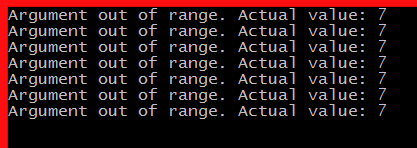
Instead of getting a runtime exception, we'll get output to our console to show us the value of our parameter. And this is probably not what we expect:


This shows us that each time we call "OutputPerson", it is called with "7" as the index. Why? Because...
The value of a captured variable is the value at the time it is used, not the value at the time it was captured.
When the captured variables actually get used, the "for" loop has completed it's run. In this case, we have 7 items in our "people" collection. That means the final value for "i" (our indexer) is "7". So when the captured variable gets used, it's value is "7" (which happens to be beyond the end of our zero-based collection).

Fixing Things Up a Bit
Now before we look at the right way to do this, we're going to make a bit of a change to the "BadCapture" method. Since we're dealing with tasks, and we're not quite sure what order things will run/complete in, I want to make sure that all of the tasks from this method have completed before we move on. Here's the code for that:


We start by creating an array of Task objects. This will be the same as the number of items that we have in our collection (7).

Then inside the "for" loop, we save off the result of "Task.Run" (which happens to be a Task) as an element of our array.

Finally, by calling "Task.WaitAll(tasks)", we're specifying that this "BadCapture" method should not return until all of the tasks have completed. This will make sure that things don't get mixed up with our next set of tasks.

Capturing an Index the Right Way
The fix to this problem is pretty simple. Instead of capturing the indexer of the "for" loop, we create a local variable which holds a copy of the value. Here's that code in a separate method:


All we did here was create a variable that is local to the body of the "for" loop called "capturedIndex". This will be a variable that is a copy of the value of the "i" indexer. Since this is a value type (an integer), this makes a copy of the value.

Then notice that when we call "OutputPerson", we use the new "capturedIndex" as a parameter. This has the effect of capturing this new locally-scoped variable.

And on each iteration through the "for" loop, we get a new "capturedIndex" variable. So in the end, we capture 7 different variables. And each variable has the expected value because each separate instance of "capturedIndex" does not get changed after it is captured.

Here's our updated console application:


And when we run this, we get a much better output:


This shows us the original bad output plus the new good output. One thing to note is that our values are not coming out in any particular order. This is because the Tasks run when the task scheduler allows them to. If we run the application again, we get results in a different order:


This has to do with how Tasks work and is not affected by our lambda expressions or captured variables. We'll save this as a topic for another day. (In the meantime, feel free to take a look at my collected articles on Task, await, and asynchronous methods.)

Now as a final step, I'll add the same Task-handling to the "GoodCapture" method as we did to the "BadCapture" method. This will just make sure that all the tasks have finished running before moving on in the console application:


As a reminder, you can get all of this code in the "CapturedVariables" project of the lambdas-and-linq project on GitHub. The changes have all been rolled into the "master" branch, but you can see the specific branch with this code here BONUSCapturedVariables branch on lambdas-and-linq.

Wrap Up
Captured variables are really cool. They let us scope our variables more appropriately, and they can give us easy access to data without having to create a class-level or global variable. But we need to remember that the value of the captured variable is the value at the time we *use* it, not the value at the time we capture it.

We usually only run into problems when we try to capture variables that are constantly changing -- such as indexers in "for" loops. But as we've seen, there is a pretty simple solution to this. We just need to make a copy to a separate, unchanging local variable, and then capture that.

If you attend one of my presentations, please feel free to ask questions or make comments. These help me know what I should be writing about or expanding on. In my experience, if one person has a particular question, there are probably plenty of other folks who have it as well.

Happy Coding!

Wednesday, February 25, 2015

The LINQ Join Method: Deciphering the Parameters

In the last few articles, I've been answering questions that have come up during my presentations of lambda expressions and LINQ, including whether we should use the methods with or without a predicate and how the OfType method actually works. To continue, we'll take a look at the "Join" method.

I'm going to spend a bit of time with "Join" because it's come up twice in the last few weeks -- once in an email and once during my presentation at the Las Vegas Code Camp last weekend. When I do my presentations, I use the fluent syntax of LINQ (also known as the method syntax where we "dot" methods together). This leads to the following question:
How do you use "Join" using the fluent syntax?
The answer is that we just need to parse the parameters of the method. When we do this, we may find ourselves using 3 different lambda expressions as parameters. So lets take things step by step.

The completed code for this can be found in the "BONUSJoinSyntax" branch of the lambdas-and-linq repository on GitHub: BONUSJoinSyntax branch. The sample is in the "JoinSyntax" project.

[Update 4/24/2015: If you'd like to see a walkthough of this on video, check out Deciphering the Join Method]

The Sample Data
When we use "Join", we combine 2 separate but related pieces of data. For this, we'll use a collection of "Person" objects and a collection of "Order" objects. Let's take a look at the objects:

From People.cs
From Orders.cs

This shows our objects. Notice that the "Order" class has a "CustomerId" property. This matches up with the "Id" property of the "Person" class. So these are the properties we will use to join our data.

The data itself comes from the "People" and "Orders" classes. Notice that each of these has a single static method that returns an IEnumerable. This is just a hard-coded list of objects that we can use in our application.

Using "Join" With the Query Syntax
We'll start by looking at how we use "Join" with the query syntax -- it's a bit easier to understand. This code is in the "OrderReports.cs" file. The idea is that we have some methods to generate reports based on our data. Then we have a console application where we display the data.

Here's a simple LINQ query that joins data from our People and Orders:


Notice that this method returns an "IEnumerable<dynamic>". We'll come back to why we're using this in a bit. Before we get to that, let's look at the body of the method.

First we call "GetPeople" and "GetOrders" to get some data to work with.

Next we create a LINQ query using the query syntax. "from p in people" says that we want to get data from the "people" collection and give it the alias "p". Then we have the join: "join o in orders" says that we want to add data from the "orders" collection, and we'll give it an alias of "o". Then we have the "on" statement. This specifies how the data is related. In this case, we say that the "Id" property of a "Person" is the same as the "CustomerId" property of an "Order". (And this is exactly what we noted above).

Finally, we have a "select" statement. For this we are using an anonymous type, which is why we have the "new" keyword without a specific type name. Inside the curly braces, we specify that we want our anonymous type to include the "LastName", "FirstName", and "OrderDate" properties.

The "var" keyword was created just for this purpose: so that we could have types without names. This is still strongly-typed, but the type only has an internal name. We can see this by putting our mouse over the "var" next to "orderDates".


This shows that "orderDates" is an "IEnumerable<T>". Right in the middle we see that "T is 'a". "'a" is the internal name that the compiler gives to our anonymous type. And at the very bottom, we can see the "'a" consists of 3 properties: LastName, FirstName, and OrderDate. (Also notice that the types for the properties are filled in as well.)

Back to the return type for the method: "IEnumerable<dynamic>". The reason I used "dynamic" is so that we can use the anonymous type in our output. Using "dynamic" is not ideal (as we'll see in just a bit), and I'd probably make this a named type in a reporting library -- but we won't worry about this today.

Running the Report
Now that we have a query, let's use it to output some data. For this, we have a simple console application in our project: "Program.cs".

Here's the code:


This calls the "OrderDatesByCustomer1" method that we just created. Then it iterates through each item and outputs it to the console.

If we put the mouse over the "var" with "item", we'll see that this is a "dynamic" object:


This means that we get absolutely zero IntelliSense on this. So inside the "foreach" loop, when we type "item." we don't get any help from Visual Studio. We have to type in "OrderDate", "FirstName", and "LastName" ourselves (and spelling and capitalization count). This is the reason why I would not use "dynamic" in a production reporting library -- it is non-discoverable, meaning we have to have intimate knowledge of the data that is coming back. (I'll update this code in a future article, but let's not let it distract us from looking at the LINQ queries.)

Here's the output when we run the console application:


We have about 20 records, and the first thing I notice is that they would benefit from being sorted. If you're curious about where this order came from, the records are in the order of the people first (which is the "outer" part of our join) and then in date order secondarily (which is the "inner" part of our join). And these are simply the order that the data comes out of the methods (not alphabetical or by date).

Let's do a few things to make this data easier to look at.

Adding Sorting and Filtering
Let's start by putting our results into order by date. That makes most sense based on the data we get back from this report. For this, we'll add an "orderby" statement to our query:


This brings some order to our results:


Next we'll add a date range filter. For this, we'll add a "where" statement:


Notice that we added "startDate" and "endDate" parameters to our method. We use these in the query with a new "where" statement to filter our data.

We need to modify our console application a bit to add the parameters. In this case, we're looking for items in the month of December 2014:


And here's the output:


Now we have a smaller set of records to work with. And this gives us a result set for us to try to match by using the fluent syntax.

Using "Join" With the Fluent Syntax
Let's try to do this same thing using the fluent LINQ syntax. In my presentation for "Learn to Love Lambdas (and LINQ, Too)", I show how to read the method signatures for several LINQ methods, including "Where", "OrderBy", and "SingleOrDefault". I won't repeat all of that here because you can see that in the downloadable materials (and in a video series that I'll be publishing in the new few weeks).

But things get a bit confusing when we look at the method signature for "Join":


This has a lot of parameters. But they are related. The first 2 parameters describe the data collections that we are joining, the next 2 parameters describe how those collections are related, and the last parameter lets us transform the data into our resulting records.

Let's step through them one at a time.

IEnumerable<TOuter> outer
This is one of our collections of data. In our case, this will be our collection of "Person" objects. So wherever we see the generic type "TOuter", we can replace it with "Person". In addition, since this is an extension method, this will actually be the type that we extend. (For more information on Extension Methods, see "Quick Byte: Extension Methods".)

Note: I'm using the word "collection" in the general sense. These are technically enumerations which can also represent calculated sequences.

IEnumerable<TInner> inner
This is the other collection that we are joining to. In our case, this will be our collection of "Order" objects. So wherever we see the generic type "TInner", we can replace it with "Order".

Key Selectors
Next, we have the key selectors. These are one of the confusing parts. But this just gives us a way to specify which properties are related. So for our "Person" (remember, this is "TOuter"), we want to use the "Id" property, and for our "Order" (the "TInner"), we want to use the "CustomerId" property.

Func<TOuter, TKey> outerKeySelector
The syntax for this is a bit strange: "Func<Person, TKey>". From working with Func, we know that this is a method that should take a "Person" as a parameter and return a "TKey". What does this mean? It means that we just need to provide a property that we can use in "equals" comparisons.

Note: If you aren't familiar with Func<T>, then you can take a look at "Get Func<>-y: Delegates in .NET".

In technical terms, this means that we need something that implements the "IEquatable" interface. If we're using standard .NET types (such as int, string, date, etc.), we don't have to do anything special; this is all built in. But if we're using a custom type, then we may need to include the interface or provide a separate equality provider. But this is usually beyond what we need to do.

Since our "Person" class is keyed off of the "Id" property (which is an integer), the actual method signature will be "Func<Person, int>" -- a method that takes a "Person" as a parameter and returns an "integer". We'll see this in a bit.

Func<TInner, TKey> innerKeySelector
To associate our "Order" class with our "Person" class, we use the "CustomerId" property (an integer) of the Order. This means that our actual method signature for this is "Func<Order, int>" -- a method that takes an "Order" as a parameter and returns an "integer".

One thing to notice is that the generic type parameter for both of our key selectors is "TKey". This means that we must use the same type (in our case, it is an integer). This makes sense since we need to compare these based on equality. If they are different types, they they couldn't be equal.

Func<TOuter, TInner, TResult> resultSelector
This last parameter is also a bit confusing. The purpose of this is to specify what we want our output to look like. Just like with our "select" statement in the LINQ query, we need to specify what we want our output to look like. And we'll use an anonymous type for our output just like we did above.

If we fill in our generic types, this means that the method signature will be "Func<Person, Order, 'a>" -- a method that takes a "Person" and an "Order" as parameters and returns an anonymous type.

Putting This All Together
Here's our initial LINQ statement using the fluent syntax:


Let's go through these parameters one at a time.

people
The first parameter is the "people" object. This is the "IEnumerable<Person>" (a.k.a. "IEnumerable<TOuter>"). Since "Join" is an extension method, our first parameter has been moved to the front.

orders
The next parameter (first inside the parentheses) is the "orders" object. This is the "IEnumerable<Orders>" (a.k.a. "IEnumerable<TInner>").

p => p.Id
Next we have our first lambda expression. Remember, this is a "Func<Person, int>" in our case. So we have a lambda expression that takes a "Person" as a parameter (our "p") and returns an integer (the "Id" property).

With lambda expressions, we can name our parameters whatever we like; however, it is very common to use single character parameter names to keep lambdas short. I use "p" to remind me that this is a "Person" object.

This syntax is very similar to what we see when we use the "OrderBy" method to specify a property for sorting. (See "Learn to Love Lambdas" for details on this.)

o => o.CustomerId
Our next lambda expression is similar to the first lambda. This one is a "Func<Order, int>". So we have a lambda expression that takes an "Order" as a parameter (our "o") and returns an integer (the "CustomerId" property).

By returning these two properties ("Id" and "CustomerId"), we let our "Join" method know how to match up the records in the different collections.

(p, o) => new { p.LastName, p.FirstName, o.OrderDate }
Our last lambda expression is what we want our resulting data to look like. As noted above, this needs to match the signature "Func<Person, Order, 'a>" in this case. So we have 2 parameters: Person and Order, and I've named these "p" and "o" respectively.

The body of the lambda is the type that we want to return. And just like when we used the "select" statement above, we use the "new" keyword to generate an anonymous type. And this type specifies that we get the "LastName" and "FirstName" properties from the "Person", and the "OrderDate" property from the "Order".

A Lot of Pieces
So, it seems that we have a lot of pieces, but if we compare this to the query syntax, we see that we have the same information, just in a bit of a different format.

Query Syntax

Fluent Syntax

Once you get comfortable with lambda expressions, the fluent syntax becomes very readable. This is one reason why teach people about lambda expressions and encourage them to use them so that they become familiar.

Using the Method
Next we'll update our console application to use the new method:


This is much the same as we have with the other method. And our output is the same as our initial output:


Let's fix this up a bit like we did with our query syntax example.

Adding Sorting and Filtering
We'll add sorting to get things into date order. One nice thing about using the fluent syntax is that we simply "dot" our methods together.

So to add sorting, we just add an "OrderBy" method call:


The "OrderBy" method needs to return a property that we can sort on. In this case, we use the "OrderDate" property. Notice that the syntax for this lambda expression is similar to what we saw with the key selectors.

This makes sense when we look at the signature for "OrderBy":


This has a "keySelector" parameter which is a "Func<TSource, TKey>" -- just like the key selectors in the "Join" parameters. The difference is that this key does a comparison (testing whether something is "greater", "lesser", or "equal") instead of an equality comparison like we have with "Join".

As a side note, I used the parameter name "r" to stand for "result" -- this is the anonymous type that is returned from the "Join" method.

When we add the "OrderBy", our results are sorted:


Finally, we'll add a filter. For this, we'll use the "Where" method. This takes a predicate like we saw when we were looking at various LINQ methods and predicates earlier.

So we'll add some parameters to our method and use them in our "Where":


The predicate for "Where" is a "Func<TSource, bool>", meaning that we take a particular type as a parameter and return a true/false value. In our case, the "TSource" is the anonymous type that is returned from our "Join".

Again, I use "r" here to stand for "result" (which is our anonymous type), and the lambda expression body returns true or false depending on whether the "OrderDate" property falls within the specified date range.

The Fluent Syntax
Once we get several of these methods together, we start to see the fluent syntax. Our call ends up as "Join(...).Where(...).OrderBy(...)".

We end up "piping" the results from one method to another. "Join" returns an IEnumerable<T>, which we use as the input for "Where". "Where" returns an IEnumerable<T>, which we use as the input for "OrderBy". And "OrderBy" returns an IOrderedEnumerable<T> which we use as our result.

As we need more functionality (such as grouping or aggregation), we simply "dot" more methods together in the order that we need.

Updated Console Application
If we update our console application to pass in the date parameters, we can run our new method. The final console application runs both of our methods: the query syntax and the fluent syntax. This lets us see the results side-by-side (sort of):


And we can see that our results are the same.

As a reminder, the code is available on GitHub: BONUSJoinSyntax branch of jeremybytes/lambdas-and-linq.

Query Syntax or Fluent Syntax?
So the question you probably have is whether you should use the query syntax or the fluent syntax. The answer is that it is entirely up to you. As mentioned previously, it's most important that you are consistent.

My personal preference has been to use the fluent syntax. This is primarily because there are many, many LINQ methods to choose from that are not available in the query syntax. This means that we need to mix query syntax with fluent syntax to get full advantage of LINQ. Because of this, I have a tendency to use the fluent syntax. This lets me stay in the mindset of "Func" and lambda expressions. And since I really love lambdas, this isn't very hard for me.

Wrap Up
The good news is that "Join" is one of the more complex LINQ methods out there. That means if you can understand how to parse the parameters for "Join", you're probably all set to parse the parameters for all of the other LINQ methods as well.

"Join" does have a lot of parameters. But as we've seen, if we take things one step at a time (and don't get frightened off), it's not very hard to implement. Although there are 5 parameters, the first 2 are the collections that we are joining, the next 2 are lambda expressions to tell how the collections are related, and the last parameter is the data transformation to the output that we want.

With this under our belt, we're well on our way to using LINQ methods effectively in our code.

Happy Coding!