Monday, July 18, 2022

Null Conditional Operators in C# - ?. and ?[]

In the last article, we took at look at Nullability in C# - What It Is and What It Is Not. When we have nullability enabled, we need to respond to the warnings that come up in our code. This often means performing null checks or giving the compiler hints to what our code is doing. Fortunately, we have a number of null operators in C# to help us with those tasks. To continue with the series of articles exploring nullability, we will look at the null conditional operators (represented by question mark dot '?.' and question mark square brackets '?[]').

Articles

The source code for this article series can be found on GitHub: https://github.com/jeremybytes/nullability-in-csharp.

The Short Version

The null conditional operators give us a shortened syntax for checking for a null object before calling a method, reading a property, indexing into an object, or accessing another member on a nullable object.

Note: We will focus on the ?. operator for the samples since this is the more common of the 2 operators.

Let's look at 2 blocks of code that are almost equivalent.

This first version checks to make sure that the "tokenSource" field is not null before calling the "Cancel" method. If the field is null, then "Cancel" is not called:


    private void CancelButton_Click(object sender, RoutedEventArgs e)
    {
        if (tokenSource is not null)
        {
            tokenSource.Cancel();
        }
    }

This second version also checks to make sure that the "tokenSource" field is not null before calling the "Cancel" method. If the field is null, then "Cancel" is not called:


    private void CancelButton_Click(object sender, RoutedEventArgs e)
    {
        tokenSource?.Cancel();
    }

I say "almost equivalent" because the null conditional operator in the second version gives us a little bit more -- it also helps with thread safety.

Let's look at these things in more detail.

"Possibly Null" Warning

We are looking at the same code as the previous article. This can be found in the "MainWindow.xaml.cs" file in the "UsingTask.UI" project of the GitHub repository.

As a reminder, the "StartingCode" folder has the starting state of the code at the beginning of the first article in the series. The "FinishedCode" has the completed code. The links in this article will point to the "FinishedCode" folder.

Our code has a nullable "tokenSource" field defined in the class (from the "MainWindow.xaml.cs" file noted above):
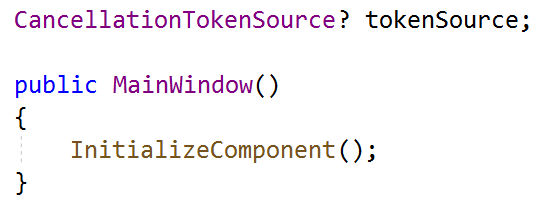

    CancellationTokenSource? tokenSource;

    public MainWindow()
    {
        InitializeComponent();
    }

Since we have a "?" at the end of the field type "CancellationTokenSource", we are indicating that this field can be null. (And since we are not assigning a value to it in the constructor, it will be null initially).

This field is used in the Cancel button's event handler:

As we saw in the last article, in the code's initial state, we get a warning when we access the "tokenSource" field:


    private void CancelButton_Click(object sender, RoutedEventArgs e)
    {
        tokenSource.Cancel();
    }

The warning tells us that the field may be null and result in a null reference exception.


CS8602: Dereference of a possibly null reference.

This gives us a warning that "tokenSource" may be null here. And if we call the "Cancel" method on a null field, we will end up with a null reference exception at runtime. (If you'd like to see this, it is shown in the previous article.)

Checking for Nulls

The traditional way to check for nulls is to wrap the code in a guard clause. This is often done with an "if" conditional:


    private void CancelButton_Click(object sender, RoutedEventArgs e)
    {
        if (tokenSource is not null)
        {
            tokenSource.Cancel();
        }
    }

The guard clause makes sure that the "tokenSource" field is not null before it attempts to call the "Cancel" method.

***THREAD SAFETY WARNING***
When we have code that references class-level fields (or other variables external to a method), there is a possibility of running into problems with threading. This is especially important to keep in mind since so much of the code we write today is asynchronous.

So what can happen here?

There is a brief period of time between when we check for the null in the "if" condition and the when we actually run the "Cancel" method. In this brief period it is possible that another method has set the "tokenSource" property to null.

The result of this would be a null reference exception when the code tries to call the "Cancel" method.

To get around this, developers will often make a local copy of the field or variable and act on that, particularly when dealing with delegates. No one else can affect the state of the local variable inside the method, so the "Cancel" method could be called with confidence.

However, there is an easier way to deal with this thread safety issue: use the null conditional operator.

Null Conditional Operator - ?.

The most common null conditional operator consists of a question mark and a dot. 

Note: The other null conditional operator uses a question mark with square brackets - ?[]. This is used to access indexers, and we will look at this briefly below. For more information, take a look at the Microsoft docs site on null conditional operators: Member Access Operators.

Here is what this null conditional operator looks like in use:


    private void CancelButton_Click(object sender, RoutedEventArgs e)
    {
        tokenSource?.Cancel();
    }

This has the same overall effect of the guard clause. At runtime, the "tokenSource" field is checked for null. If the field is not null, then the "Cancel" method is called normally.

If the field is null, the operation stops. The "Cancel" method is not called.

But a shortened syntax is not all that we get with the null conditional operator. We also get thread safety.

Thread Safety
The language designers took threading into account when they created this operator. From the developer's perspective, the null check and "Cancel" method call happen as a single operation, meaning that there is no possibility that something else would be able to set the "tokenSource" field to null in the middle.

I say "from the developer perspective" because the implementation is a little more complex than that. If you're curious, you can always fire up ILDASM (which is still included with the Visual Studio developer tools) and look at the IL (intermediate language) that is generated by the compiler.

What About Return Values or Properties?

The next question is what happens if we use the null conditional operator to call a method that returns a value or reads a property?

The short answer is that if the null conditional operator encounters a null, then the return value or property will be returned as "null".

As an example, let's say that we only want to call the "Cancel" method if the cancellation token is not already in a "canceled" state. Our "tokenSource" field has a property called "IsCancellationRequested" that we can use to check that.

Here's what that code may look like (note: this is not in the final code sample):


    private void CancelButton_Click(object sender, RoutedEventArgs e)
    {
        if (!tokenSource?.IsCancellationRequested)
        {
            tokenSource?.Cancel();
        }
    }

This uses an "if" statement to check the "IsCancellationRequested" property on the "tokenSource" field.

But we have some red squigglies. Here is the error message:


CS0266: Cannot implicitly convert type 'bool?' to 'bool'. An explicit conversion exists (are you missing a cast?)

This tells us that "if" needs a non-nullable Boolean value ("bool"). But since we use the null conditional operator, when we try to read "IsCancellationRequested", we may get a "null" back (this is noted with the nullable Boolean ("bool?") in the message).

We won't go through the trouble of fixing this code here. This sample is to show what happens when we use the null conditional operator on something that returns a value (either by calling a method or reading a property). In those cases, we may get a "null" returned.

Null Coalescing Operator - ??
In a future article, we will take a look at the null coalescing operator that lets us return a default value if we run across a null. This can help us fix things like the scenario above and eliminate possible null values.

Null Conditional Operator - ?[]

The null conditional operator that consists of a question mark and a set of square brackets is used for indexers on objects. The behavior is very similar to using the ?. operator to access a property.

For example, let's consider the following code (note: this is not part of the sample code on GitHub):


    List<Person>? people = null;
    Person? firstPerson = people?[0];

In this code, "people" is a nullable list of "Person" objects (and we set it to null). When we try to index into the "people" list, we put a question mark between "people" and the square brackets with the indexer.

If "people" is null, the indexer is not accessed, and so we do not get a null reference exception here. The "firstPerson" variable would then be assigned "null".

If "people" is not null, the indexer is accessed, and the first item in the collection will be returned.

As a side note, if the list is empty, we will get an "Index Out of Range" exception at runtime. But this is something we normally have to deal with regardless of whether nullability is enabled.

So we can use the ?[] null conditional operator to index into a nullable object. And this works similarly to using the ?. null conditional operator to access a property on a nullable object. If the object is null, then we get a null back. If the object is not null, then we get the item at the index or the value of the property.

Wrap Up

The null conditional operators can help us in 2 ways. First they can shorten our code by eliminating the need for a separate guard clause that specifically checks for "null". Secondly, they give us thread safety during the null check, so we do not need to worry about the possibility of a "null" sneaking into our code in a multi-threaded or async scenario.

Enabling nullability gives us the warnings we need to eliminate possible nulls in our code. And the null operators (including the null conditional operators) can help us in dealing with those warnings.

In the next 2 articles, we will look at the null forgiving operator as well as the null coalescing operators. These give us additional tools when dealing with possible nulls in our code. Be sure to check back for more.


Happy Coding!

Friday, July 15, 2022

Nullability in C# - What It Is and What It Is Not

Starting with .NET 6, new projects have nullable reference types enabled by default. It is easy to get confused on exactly what that means, particularly when migrating existing projects. Today, we'll take a look at what nullability is and what it isn't. In future articles, we'll look at the null operators in C# (null conditional, null coalescing, and null forgiving) -- these are all various combinations of "?", "!", and ".".

Articles

The source code for this article series can be found on GitHub: https://github.com/jeremybytes/nullability-in-csharp.

The Short Version

Nullability Is:
  • A way to get compile-time warnings about possible null references
  • A way to make the intent of your code more clear to other developers
Nullability Is NOT:
  • A way to prevent null reference exceptions at runtime
  • A way to prevent someone from passing a null to your method or assigning a null to an object

Read on for details and examples.

Getting a Null Reference Exception at Runtime

Before looking at what nullability gives us, let's take a look at a project that does not have nullability enabled. This can be found at the GitHub repository noted above:  https://github.com/jeremybytes/nullability-in-csharp. (See the README file of on the repository for information on how to run the application yourself.)

The "StartingCode" folder contains a set of projects where nullability is not enabled. Here is a screenshot of the running application (the "UsingTask.UI" project in the solution):


And here is the code hooked up to to the "Cancel" button at the bottom (specifically from the MainWindow.xaml.cs file in the "UsingTask.UI" project):


    private void CancelButton_Click(object sender, RoutedEventArgs e)
    {
        tokenSource.Cancel();
    }

The problem with the code is that the "tokenSource" field in this code may be null. (We won't go into the details of why that may be true; if you want more information, you can look at the resources about Task and Cancellation here: https://github.com/jeremybytes/using-task-dotnet6.)

If we run the application and then immediately click the "Cancel" button (without clicking either of the other buttons first), we get a runtime error -- a Null Reference Exception:


System.NullReferenceException: "Object reference not set to an instance of an object."

This is because we are trying to call the "Cancel" method on a null tokenSource.

Nullability and nullable reference types are there to help us prevent these types of errors. So let's enable nullability and see what we help we get (and what help we do not get).

Enabling Nullable Reference Types

As mentioned above, nullability is enabled by default when you create a project with .NET 6. Nullability can also be enabled by editing the .csproj file for projects that are upgraded from .NET 5 or .NET Core.

To enable nullable reference types, set the "Nullable" property to enable in the .csproj file. Here is an excerpt from the UsingTask.UI.csproj file (note the code in the "StartingCode" folder has this commented out; the "FinishedCode" has it uncommented):


    <PropertyGroup>
        <OutputType>WinExe</OutputType>
        <TargetFramework>net6.0-windows</TargetFramework>
        <ImplicitUsings>enable</ImplicitUsings>
        <Nullable>enable</Nullable>
        <UseWPF>true</UseWPF>
    </PropertyGroup>

Note: I also made this change to the UsingTask.Library.csproj file (but we will not look at this project until a later article).

Now that nullability is enabled, let's take a look at what this means for the project.

With this property set, all reference types (whether they used as fields, properties, method arguments, return types, or in other ways) are assumed to be non-nullable. To make a reference type nullable, we need to explicitly state that (and we will see how in just a bit).

Nullability Is: A way to get compile-time warnings about possible null references

The first thing we can do is see what messages we get. If we re-build the solution, some green squigglies will show up to alert us to possible problems. For example, there is now a warning on on the constructor for the MainWindow class:


    CancellationTokenSource tokenSource;

    public MainWindow()
    {
        InitializeComponent();
    }

If we hover over the warning, we can get the details:


CS8618: Non-nullable field 'tokenSource' must contain a non-null value when exiting constructor. Consider declaring the field as nullable.

This message tells us that the "tokenSource" field will be null when the constructor exits (and so the field will be null).

Another way is to open the "Error List" in Visual Studio to see each of the warnings listed.


This includes the message above as well as 2 others (we will explore these in later articles).

So Nullability is a way to get compile-time warnings about possible null references.

Nullability Is NOT: A way to prevent null reference exceptions at runtime

Although we get the warnings (and that helps us), this does not prevent us from building and running the application.

If we build and run the application again, and then click the "Cancel" button, we get the same Null Reference Exception that we got before:


System.NullReferenceException: "Object reference not set to an instance of an object."

Even though the "tokenSource" field is non-nullable, this is not enforced at runtime. Since we do not assign a value to the "tokenSource" in the constructor, it is null when we use it in the Cancel button's event handler.

So Nullability is not a way to prevent null reference exceptions at runtime.

This is important to keep in mind when we are working with nullability. It is helpful to us at compile-time, but it does not have a runtime effect.

Nullability Is NOT: A way to prevent someone from passing a null to your method or assigning a null to an object

As we saw above, these are compiler warnings (and those warnings are useful). But they do not prevent someone from assigning "null" to an object or passing "null" as an argument to a method.

As a very contrived example, we can assign a "null" to the "tokenSource" field in the constructor:


    CancellationTokenSource tokenSource;

    public MainWindow()
    {
        InitializeComponent();
        tokenSource = null;
    }

We do get a warning:


CS8625: Cannot convert null literal to non-nullable reference type.

And the warning is useful. If we have our compiler set to fail on warnings (which is used by many teams), then it would stop this code from compiling. But there is nothing that forces another developer to have "fail on warnings" turned on. The code is still buildable and runnable.

More subtly, if we are building a library that is used by another project, that project could pass a null to one of our library methods (even if we have it specified as non-nullable). So it is still very important that we check for nulls in our code. We'll dive into this a little deeper in a subsequent article.

So Nullability is not a way to prevent someone from passing a null to your method or assigning a null to an object.

Nullability Is: A way to make the intent of your code more clear to other developers

One key feature of nullable reference types is that it can make the intent of your code more clear. When we have nullability enabled in our code, all reference types are non-nullable by default. If we want to have a field or variable that is nullable, we need to mark it as such using "?".

The "tokenSource" field should be nullable. To let other developers (and the compiler) know about this, we add a question mark at the end of the type when we declare the field:


    CancellationTokenSource? tokenSource;

    public MainWindow()
    {
        InitializeComponent();
    }

This means that the "tokenSource" field is allowed to be null, and the warning that we got on the constructor is now gone.

But now that the "tokenSource" field is nullable, we get a different warning in the Cancel button's event handler:


    private void CancelButton_Click(object sender, RoutedEventArgs e)
    {
        tokenSource.Cancel();
    }

Here are the message details:


'tokenSource' may be null here.
CS8602: Dereference of a possibly null reference.

This tells us that we have a potential for a null reference exception at runtime (and we have seen that happen several times already).

When we come across a message like this, we should have a guard clause that does a null check. The way that we used to do this is to wrap the code in an "if" statement:


    private void CancelButton_Click(object sender, RoutedEventArgs e)
    {
        if (tokenSource is not null)
        {
            tokenSource.Cancel();
        }
    }

This code makes sure that "tokenSource" is not null. If it is null, then it skips over the code and does nothing. Otherwise, it will run the "Cancel" method. This prevents the null reference exception at runtime.


Even if we click the "Cancel" button immediately after starting the application, we do not get a null reference exception. This is because we have a guard clause to prevent that.

The code above works, but there is an easier way of doing this with the null conditional operator:


    private void CancelButton_Click(object sender, RoutedEventArgs e)
    {
        tokenSource?.Cancel();
    }

We won't go into the details of the null conditional operator right now; that is the subject of the next article.

Wrap Up

So we have seen that nullability and nullable reference types can be very useful for sharing the intent of our code. It can also help us find potential null reference exceptions in our application. But it does not stop us from compiling, and it does not stop null reference exceptions from happening at runtime.

Nullability Is:
  • A way to get compile-time warnings about possible null references
  • A way to make the intent of your code more clear to other developers
Nullability Is NOT:
  • A way to prevent null reference exceptions at runtime
  • A way to prevent someone from passing a null to your method or assigning a null to an object
The usefulness is very good, and it can save us a lot of time hunting down bugs in our code. But we do need to be careful not to rely on it too heavily.


Happy Coding!

Wednesday, April 13, 2022

Returning HTTP 204 (No Content) from .NET Minimal API

 I recently converted some ASP.NET web api projects from using controllers to using minimal apis. And I ran into a weirdness. If you return "null" from a controller method, then the response is HTTP 204 (No Content), but if you return "null" from a minimal api, the response is HTTP 200 (OK) with the string "null" as the body.

The short version:
To return HTTP 204 from a minimal API method, use "Results.NoContent()" as your return value.
This also means that if you want to return actual content, you will need to wrap that in something like "Results.Json(your_content)".

If you're interested, read on for my experience. I'm sure that I'll get "Jeremy, you're doing it wrong" responses, but that does not invalidate my learning path which may help someone else.

I'll start out by saying that web api is not my area of expertise. I primarily use it so that I can spin up test services to get fake data for my applications.

Controller Behavior

For my api, there is an endpoint that allows you to get an individual "Person" item by specifying an ID. 

Sample endpoint:
    http://localhost:9874/people/2

Sample output:

    {"id":2,"givenName":"Dylan","familyName":"Hunt","startDate":"2000-10-02T00:00:00-07:00","rating":8,"formatString":""}


This comes from a controller method that looks like this:
    [HttpGet("{id}")]
    public async Task<Person?> GetPerson(int id)
    {
        return await _provider.GetPerson(id);
    }

The return value from this method is a nullable Person. If the ID is found, then the Person is returned, otherwise, "null" is fine.

However, the result to the caller is not "null", instead it is an HTTP 204 (No Content). This is appropriate, and we can see some Fiddler results that show this.

Valid Record
Fiddler "Raw" result with call to "http://localhost:9874/people/2":
HTTP/1.1 200 OK
Content-Type: application/json; charset=utf-8
Date: Wed, 13 Apr 2022 14:26:50 GMT
Server: Kestrel
Content-Length: 117

{"id":2,"givenName":"Dylan","familyName":"Hunt","startDate":"2000-10-02T00:00:00-07:00","rating":8,"formatString":""}
This shows the HTTP 200 (OK) with the JSON results at the bottom.

Invalid Record
Fiddler result with call to "http://localhost:9874/people/20":
HTTP/1.1 204 No Content
Content-Length: 0
Date: Wed, 13 Apr 2022 14:27:00 GMT
Server: Kestrel
This shows that if we use id=20 (which does not exist), then we get the HTTP 204 (No Content) that we expect for this api.

Minimal API Default Template

Since this service had only a few endpoints (3), I converted them to use minimal apis in .NET 6. To be honest, I did not do a lot of research before attempting this. I primarily looked at the default template for the minimal api project and went from there.

I used the following command to generate the project from the template:
    dotnet new webapi -minimal --no-https

The sample endpoint has weather forecast data:
  app.MapGet("/weatherforecast", () =>
  {
      var forecast =  Enumerable.Range(1, 5).Select(index =>
          new WeatherForecast
          (
              DateTime.Now.AddDays(index),
              Random.Shared.Next(-20, 55),
              summaries[Random.Shared.Next(summaries.Length)]
          ))
          .ToArray();
      return forecast;
  })
  .WithName("GetWeatherForecast");
This shows a "/weatherforecast" endpoint that does not take parameters, and returns the resulting object (an array of "WeatherForecast") directly.

My First Pass

On my first pass at this, I attempted something similar. Here's the endpoint that I created:
    app.MapGet("/people/{id}", async (int id, IPeopleProvider provider) => 
    {
        return await provider.GetPerson(id);
    })
    .WithName("GetPerson");
This is a bit more complex since the endpoint has a parameter, and the method has some dependency injection.

The basics of the lambda expression parameters: the first parameter ("id") is mapped to the "{id}" parameter of the endpoint. The "provider" parameter comes from the dependency injection container. The controller version also uses dependency injection (although the "IPeopleProvider" dependency is mapped through the constructor rather than the method).

The content of the minimal api method is exactly the same as the content of the controller method (the return type is "Task<Person?>" in both cases).

However, the behavior is different.

Let's look at some output.

Valid Record
Fiddler "Raw" result with call to "http://localhost:9874/people/2":
HTTP/1.1 200 OK
Content-Type: application/json; charset=utf-8
Date: Wed, 13 Apr 2022 14:27:46 GMT
Server: Kestrel
Content-Length: 117

{"id":2,"givenName":"Dylan","familyName":"Hunt","startDate":"2000-10-02T00:00:00-07:00","rating":8,"formatString":""}
This is the same result that we had with the controller method: HTTP 200 (OK) with the JSON results at the bottom.

Invalid Record
Fiddler result with call to "http://localhost:9874/people/20":
HTTP/1.1 200 OK
Content-Type: application/json; charset=utf-8
Date: Wed, 13 Apr 2022 14:27:49 GMT
Server: Kestrel
Content-Length: 4

null
This is where things get strange. The result is HTTP 200 (OK) and the body of the response is "null" -- the string "null".

This looks even stranger when you run this in a browser. 

Web browser open tab with the string "null" shown as the output.


This is not the behavior that I want (and it actually broke some code that was looking for the HTTP 204 status code).

Returning HTTP 204 (No Content)

I did a little bit of searching and found some other folks who were getting the behavior. In the end I found I needed to take more control over the response from the api method.

Here's the method that I ended up with:
    app.MapGet("/people/{id}", async (int id, IPeopleProvider provider) => 
    {
        var person = await provider.GetPerson(id);
        return person switch
        {
            null => Results.NoContent(),
            _ => Results.Json(person)
        };
    })
    .WithName("GetPerson");
This is a bit different. In this case, I get the "person" back from the "GetPerson" method on the provider. This will either be populated or null (as we saw before).

Then if the "person" variable is null, I explicitly return "Results.NoContent()".

If the "person" variable is not null, then I take the value and wrap it in "Results.Json()".

Note: We cannot just return the "person" variable like we did earlier because we need the signature of the lambda expression to be consistent. Since the "null" path returns a "Results", we need the happy path to also return a "Results".

This gets us back to where we were before:

Valid Record
Fiddler "Raw" result with call to "http://localhost:9874/people/2":
HTTP/1.1 200 OK
Content-Type: application/json; charset=utf-8
Date: Wed, 13 Apr 2022 15:27:32 GMT
Server: Kestrel
Content-Length: 117

{"id":2,"givenName":"Dylan","familyName":"Hunt","startDate":"2000-10-02T00:00:00-07:00","rating":8,"formatString":""}
This shows the HTTP 200 (OK) with the JSON results at the bottom.

Invalid Record
Fiddler result with call to "http://localhost:9874/people/20":
HTTP/1.1 204 No Content
Date: Wed, 13 Apr 2022 15:27:34 GMT
Server: Kestrel
This shows that if we use ID=20 (which does not exist), then we get the HTTP 204 (No Content) that we expect for this api. (Yay!)

Why I Wrote This

The reason I wrote this article is two-fold. The first is that if I have run into an issue, there are probably other folks who have run into it as well. More info is good.

The second is that I'm a bit frustrated with the messaging that comes from Microsoft. I should be used to it by now. I have been seeing for years how "easy" something is in the demo. But when it comes to building something a bit more real, things get harder.

In particular, the default template is a bit misleading. Yes, it will work for a lot of scenarios, but since the behavior here is specifically different from using controllers (which many people will be converting from), it would be really nice to have a "this is different" marker somewhere.

The other thing is about "minimal api" tutorial (Tutorial: Create a minimal web API with ASP.NET Core). Even though it does show using "Results" in the code, the only instruction is "copy this code into your project". There is no explanation of the code or why you might need it. (In my opinion, it's not much of a tutorial if it doesn't explain why you are doing something.)

Anyway, I hope that this will be helpful to someone out there. Feel free to share your thoughts.

Wrap Up

I seem to be having quite a few "who moved my cheese?" moments as the .NET framework and C# language continue to evolve. I really don't mind my cheese being somewhere else, but I would *really* appreciate a sign that says:
"Your cheese is no longer here. Here's where you can find it."
Happy Coding!

Monday, December 20, 2021

Cancelling IAsyncEnumerable in C#

IAsyncEnumerable combines the power of IEnumerable (which lets us "foreach" through items) with the joys of async code (that we can "await"). Like many async methods, we can pass in a CancellationToken to short-circuit the process. But because of the way that we use IAsyncEnumerable, passing in a cancellation token is a bit different than we are used to.

Short Version:
The "WithCancellation" extension method on IAsyncEnumerable lets us pass in a cancellation token.
Let's take a quick look at how to use IAsyncEnumerable, and then we'll look at cancellation.

Using IAsyncEnumerable

I started using IAsyncEnumerable when I exploring channels in C#. Here's an example method that uses "await foreach" with an IAsyncEnumerable (taken from the Program.cs file of this GitHub repository: https://github.com/jeremybytes/csharp-channels-presentation):
    private static async Task ShowData(ChannelReader<Person> reader)
    {
        await foreach(Person person in reader.ReadAllAsync())
        {
            DisplayPerson(person);
        };
    }
The ChannelReader type has a "ReadAllAsync" method that returns an IAsyncEnumerable. What this means is that someone else can be writing to the channel while we read from it. The IAsyncEnumerable means that if there is not another item ready to read, we can wait for it. So, we can pull things off the channel as they are added, even if there are delays between each item getting added.

Waiting for items can cause a problem, and that's where the "async" part comes in. Since this is asynchronous, we can "await" each item. This gives us the advantages that we are used to with "await", meaning that we are not blocking processes and threads while we wait.

By using "await foreach" on an IAsyncEnumerable, we get this combined functionality: getting the next item in the enumeration and waiting asynchronously if the next item isn't ready yet.

For more information on channels, check the repository for list of articles and a recorded presentation: https://github.com/jeremybytes/csharp-channels-presentation.

The IAsyncEnumerable Interface

Things got a little more interesting when I was building my own classes that implement IAsyncEnumerable. The interface itself only has one method: GetAsyncEnumerator. An implementation could look something like this (we'll call this our "Processor" since it will process some custom data for us):
    public IAsyncEnumerator<int> GetAsyncEnumerator(
        CancellationToken cancellationToken = default)
    {
        while (...)
        {
            // interesting async stuff here
            yield return nextValue;
        }
    }
Like with IEnumerable, we can use "yield return" to return the next value from the enumeration. Unlike IEnumerable, we can also put asynchronous code in here, whether it's an asynchronous service call or waiting for a record to finish a complex process. (That goes in the "// interesting async stuff here" section; we won't look at that today.)

CancellationToken Parameter

An interesting thing about the GetAsyncEnumerable method is that it has a CancellationToken parameter. Notice that the the CancellationToken has a "default" value set. This means that the cancellation token is optional. If we do not pass in a token, the code will still work.

If we wanted to check the cancellation token in the code. This could look something like this:
    public async IAsyncEnumerator<int> GetAsyncEnumerator(
        CancellationToken cancellationToken = default)
    {
        while (...)
        {
            cancellationToken.ThrowIfCancellationRequested();
            // interesting stuff here
            yield return nextValue;
        }
    }
Each time through the "while" loop, the cancellation token will be checked. If cancellation is requested, then this will throw an OperationCanceledException.

Passing a Cancellation Token

The next part is where things get interesting. How do we actually pass a cancellation token to the IAsyncEnumerable? If we are using the "Processor" that we created above. That call could look something like this.
    await foreach (int currentItem in processor)
    {
        DisplayItem(currentItem);
    }
When we use "foreach", we do not call the "GetAsyncEnumerable" directly. That also means that we cannot pass in a cancellation token directly.

But there is an extension method available on IAsyncEnumerable that helps us out: WithCancellation.

Here's that same foreach loop with a cancellation token passed in:
    await foreach (int currentItem in processor.WithCancellation(tokenSource.Token))
    {
        DisplayItem(currentItem);
    }
This assumes that we have a CancellationTokenSource (called "tokenSource") elsewhere in our code.

For more information on Cancellation, you can refer to Task and Await: Basic Cancellation. The article was written a while back. Updated code samples (.NET 6) are available here: https://github.com/jeremybytes/using-task-dotnet6.

ConfigureAwait

As a side note, there is another extension method on IAsyncEnumerable: ConfigureAwait. This lets us use "ConfigureAwait(false)" in areas that we need it. ConfigureAwait isn't needed in the ASP.NET world anymore, but it can still be useful if we are doing desktop or other types of programming.

Wrap Up

IAsyncEnumerable gives us some pretty interesting abilities. I've been exploring it quite a bit lately. In some code comparisons, I was able to move async code into a library that made using it quite a bit easier. Once that sample code is ready, I'll be sharing it on GitHub.

Until then, keep exploring. Sometimes the answers are not obvious. It's okay if it takes some time to figure things out.

Happy Coding!

Thursday, September 30, 2021

Coding Practice: Learning Rust with Fibonacci Numbers

In my exploration of Rust, I built an application that calculates Fibonacci numbers (this was a suggestion from the end of Chapter 3 of The Rust Programming Language by Steve Klabnik and Carol Nichols).

It helped me learn a bit more about the language and environment.
  • for loops
  • Statements vs. expressions
  • Function returns (expressions)
  • checked_add to prevent overflow
  • Option enum (returned from checked_add)
  • Pattern matching on Option
  • Result enum (to return error rather than panic)
  • .expect with Result
  • Pattern matching on Result
So let's walk through this project.

The code is available on GitHub: https://github.com/jeremybytes/fibonacci-rust, and branches are set up for each step along the way. We will only be looking at the "main.rs" file in each branch, so all of the links will be directly to this file.

Fibonacci Numbers

The task is to calculate the nth Fibonacci number. The Fibonacci sequence is made by adding the 2 previous number in the sequence. So the sequence starts: 1, 1, 2, 3, 5, 8, 13, 21, 34. The 7th Fibonacci number (13) is the sum of the previous 2 numbers (5 and 8).

For our application, we will create a function to generate the nth Fibonacci number based on an input parameter. We'll call this function with multiple values and output the results.

Step 1: Creating the Project

Branch: 01-creation
The first step is to create the project. We can do this by typing the following in a terminal:
    cargo new fib
This will create a new folder called "fib" along with the Rust project file, a "src" folder to hold the code, and a "main.rs" file (in src) which is where we will be putting our code.

The "main.rs" file has placeholder code:
    fn main() {
        println!("Hello, world!");
    }
But we can use "cargo run" to make sure that everything is working in our environment.
    C:\rustlang\fib> cargo run
       Compiling fib v0.1.0 (C:\rustlang\fib)
        Finished dev [unoptimized + debuginfo] target(s) in 0.63s
         Running `target\debug\fib.exe`
    Hello, world!
Going forward, I'll just show the application output (without the compiling and running output).

Step 2: Basic Fibonacci

Branch: 02-basic
Now that we have the shell, let's create a function to return a Fibonacci number. Here's the completed function:
    fn fib(n: u8) -> u64 {
        let mut prev: u64 = 0;
        let mut curr: u64 = 1;
        for _ in 1..n {
            let next = prev + curr;
            prev = curr;
            curr = next;
        }
        curr
    }
There are several interesting bits here. Let's walk through them.

Declaring a Function
Let's start with the function declaration:
    fn fib(n: u8) -> u64 {

    }
The "fn" denotes that this is a function. "fib" is the function name. "n: u8" declares a parameter called "n" that is an unsigned 8-bit integer. And the "u64" after the arrow declares that this function returns an unsigned 64-bit integer.

When declaring parameters and return values for functions, the types are required. Rust does use type inference in some places (as we'll see), but function declarations need to have explicit types.

Declaring Variables
Next, we have some variables declared and assigned:
    let mut prev: u64 = 0;
    let mut curr: u64 = 1;
"let" declares a variable.

By default, variables are immutable. This means that once we assign a value, we cannot change it. For these variables, we use "mut" to denote that they are mutable. So we will be able to change the values later.

The variable names are "prev" and "curr". These will hold the "previous number" and the "current number" in the sequence.

The ": u64" declares these as unsigned 64-bit integer values. Fibonacci numbers tend to overflow very quickly, so I used a fairly large integer type.

Finally, we assign initial values of 0 and 1, respectively.

Looping with "for"
There are several ways to handle the loop required to calculate the Fibonacci number. I opted for a "for" loop:
    for _ in 1..n {

    }
"1..n" represents a range from 1 to the value of the incoming function argument. So if the argument is "3", this represents the range: 1, 2, 3.

The "for" statement will loop once for each value in the range. In this case the "_" denotes that we are not using the actual range value inside the loop. All we really need here is to run the loop 3 times. All of the calculation is done inside the loop itself.

Implicit Typing
Inside the "for" loop we do our calculations:
    let next = prev + curr;
    prev = curr;
    curr = next;
This creates a new variable called "next" inside the loop and assigns it the sum of "prev" and "curr". A couple of things to note. First, this variable is immutable (so we do not have the "mut" keyword). The value is assigned here and then it is not changed. Second, the "next" variable is implicitly typed. Instead of having a type declaration, it is set based on what is assigned to it. Since we are assigning the sum of two u64 values, "next" will also be a u64.

The next two lines update the "prev" and "curr" values. We needed to mark them as mutable when we declared them so that we could update them here.

This is a fairly naïve way of calculating Fibonacci numbers. If you'd like to see more details on how the calculation works, you can take a look at this article: TDDing into a Fibonacci Sequence with C#.

Statements vs. Expressions
The last line of the function is a bit interesting:
    curr
This returns the current value ("curr") from the function.

Rust does not use a "return" keyword to return a value. Instead, the last expression in a function is what is returned. (As a side note, this is similar to how F# works.)

What's the difference between a statement and an expression? A statement does some type of work; an expression returns a value.

In Rust, a statement ends with a semi-colon, and an expression does not end with a semi-colon. To make things more interesting, these are often combined.

Let's take a look back at a line of code:
    let next = prev + curr;
Overall, this is a statement: it declares and assigns a value to a variable called "next". And it ends with a semi-colon.
    prev + curr
"prev + curr" is an expression that returns the result of adding 2 values. So we really have a statement that includes an expression. (We can technically break this down further, but we won't do that here.)

So, let's get back to the return value of the function. The "fib" function returns a u64 value. The last expression in the function is:
    curr
It is important to note that this line does not end with a semi-colon. Because of this, the value of the "curr" variable (which is a u64) is returned for this function.

Because of my coding history, I'm used to putting semi-colons at the end of lines. So I'm sure that I'll mess this up many times before I get used to it. If you get an error that says a function is returning "()" instead of a particular type, it probably means that there's a semi-colon at the end of the expression you meant to return.

Here's the full function:
    fn fib(n: u8) -> u64 {
        let mut prev: u64 = 0;
        let mut curr: u64 = 1;
        for _ in 1..n {
            let next = prev + curr;
            prev = curr;
            curr = next;
        }
        curr
    }
Using the "fib" Function
Now that we have a function that returns a Fibonacci number, it's time to update the "main" function to use it.
    fn main() {
        println!("Fibonacci 1st = {}", fib(1));
        println!("Fibonacci 2nd = {}", fib(2));
        println!("Fibonacci 3rd = {}", fib(3));
        println!("Fibonacci 4th = {}", fib(4));
        println!("Fibonacci 5th = {}", fib(5));
    }
This uses the "println!" macro to output a string to the standard output. On each line, the set of curly braces represents a placeholder in the string. So in the first statement, the curly braces will be replaced by the value that comes back from calling "fib(1)".

So let's run and check the output:
    Fibonacci 1st = 1
    Fibonacci 2nd = 1
    Fibonacci 3rd = 2
    Fibonacci 4th = 3
    Fibonacci 5th = 5
It works!

Well, it mostly works. We'll see a shortcoming in a bit.

Step 3: Testing More Values

Branch: 03-mainloop
Before looking at where we have a problem in the "fib" function, let's make it easier to test for different values. For this, we'll add an array of numbers to test, and then loop through them.

Here's an updated "main" function:
    fn main() {
        let nths = [1, 2, 3, 4, 5, 6, 7, 8, 9, 10];

        for nth in nths {
            println!("Fibonacci {} = {}", nth, fib(nth));
        }
    }
Creating an Array
The first line sets up an array called "nths" and initializes it with the values of 1 through 10. I use this name because our original task was to calculate the "nth" Fibonacci number. This is a collection of all the ones we want to calculate.

We're using type inference to let the compiler pick the type for "nths". In this case, it determines that it is an array with 10 elements of type u8. It decides on u8 because the values are used as arguments for the "fib" function, and that takes a u8.

As an interesting note, if you comment out the "println!" statement, the "nths" variable is an array with 10 elements of type i32 (a signed 32-bit integer). This is the default integer type.

Type inference works as long as it can be determined at compile time. If it cannot be determined at compile time, then an explicit type needs to be added.

Another "for" Loop
We use a "for" loop to go through the array. Instead of discarding the value from the "for" loop (like we did above), we capture it in the "nth" variable.

Inside the loop, we have a "println!" with 2 placeholders, one for the loop value and one for the result of the "fib" function.

Here's what that output looks like:
    Fibonacci 1 = 1
    Fibonacci 2 = 1
    Fibonacci 3 = 2
    Fibonacci 4 = 3
    Fibonacci 5 = 5
    Fibonacci 6 = 8
    Fibonacci 7 = 13
    Fibonacci 8 = 21
    Fibonacci 9 = 34
    Fibonacci 10 = 55
And now we can more easily test values by adding to the array.

Overflow!
As I noted at the beginning, Fibonacci sequences tend to overflow pretty quickly (they increase the value by half for each item). We can see this by adding a "100" to our array.
    let nths = [1, 2, 3, 4, 5, 6, 7, 8, 9, 10, 100];
Here's the output when we run with these values:
    Fibonacci 1 = 1
    Fibonacci 2 = 1
    Fibonacci 3 = 2
    Fibonacci 4 = 3
    Fibonacci 5 = 5
    Fibonacci 6 = 8
    Fibonacci 7 = 13
    Fibonacci 8 = 21
    Fibonacci 9 = 34
    Fibonacci 10 = 55
    thread 'main' panicked at 'attempt to add with overflow', src\main.rs:13:20
    note: run with `RUST_BACKTRACE=1` environment variable to display a backtrace
    error: process didn't exit successfully: `target\debug\fib.exe` (exit code: 101)
This creates a "panic" in our application, and it exits with an error.

With a little experimentation, we will find that the 93rd Fibonacci number is fine, but the 94th will overflow the u64 value.

Checking for Overflow

Branch: 04-checkedadd
Now we can work on fixing the overflow. Our problem is with this line:
    let next = prev + curr;
If "prev" and "curr" are near the upper limits of the u64 range, then adding them together will go past that upper limit.

Some other languages will "wrap" the value (starting over again at 0). Rust will generate an error instead (in the form of a panic). If you do want to wrap the value, Rust does offer a "wrapped_add" function that does just that.

But we do not want to wrap, we would like to catch the error and give our users a better experience.

checked_add
Instead of using the default "+" operator, we can use the "checked_add" function. Here is that code:
    let result = prev.checked_add(curr);
"checked_add" does not panic if the value overflows. This is because it uses the Option enum.

Option Enum
The Option enum lets us return either a valid value or no value. "Some<T>" is used if there is a valid value, otherwise "None" is used.

For example, let's say that "prev" is 1 and "curr" is 2. The "result" would be "Some(3)".

If "prev" and "curr" are big enough to cause an overflow when added together, then "result" would be "None".

Pattern Matching
The great thing about having an Option as a return type is that we can use pattern matching with it.

Here is the inside of the updated "for" loop:
    let result = prev.checked_add(curr);
    match result {
        Some(next) => {
            prev = curr;
            curr = next;
        }
        None => {
            curr = 0;
            break;
        }
    }
The "match" keyword sets up the pattern matching for us.

The first "arm" has "Some(next)" as the pattern. The "next" part lets us assign a name to the value that we can use inside the block. In this case, "next" will hold the same value that it did in the earlier version ("prev" + "curr"), so inside the block, we can assign the "prev" and "curr" values like we did before.

The second "arm" has "None" as the pattern. This will be used if there is an overflow. If there is an overflow, then we set the "curr" variable to 0 and then break out of the "for" loop.

Here is the updated "fib" function:
    fn fib(n: u8) -> u64 {
        let mut prev: u64 = 0;
       let mut curr: u64 = 1;
        for _ in 1..n {
            let result = prev.checked_add(curr);
            match result {
                Some(next) => {
                    prev = curr;
                    curr = next;
                }
                None => {
                    curr = 0;
                    break;
                }
            }
        }
        curr
    }
Here's an updated array to test valid values and overflow values:
    let nths = [1, 2, 3, 4, 5, 6, 7, 8, 9, 10, 90, 91, 92, 93, 94, 95, 96];
And here's the output:
    Fibonacci 1 = 1
    Fibonacci 2 = 1
    Fibonacci 3 = 2
    Fibonacci 4 = 3
    Fibonacci 5 = 5
    Fibonacci 6 = 8
    Fibonacci 7 = 13
    Fibonacci 8 = 21
    Fibonacci 9 = 34
    Fibonacci 10 = 55
    Fibonacci 90 = 2880067194370816120
    Fibonacci 91 = 4660046610375530309
    Fibonacci 92 = 7540113804746346429
    Fibonacci 93 = 12200160415121876738
    Fibonacci 94 = 0
    Fibonacci 95 = 0
    Fibonacci 96 = 0
Setting "curr" to 0 is not a great way to handle our error state. For now, it is fine because it gets rid of the panic, and our application keeps running.

Next up, we'll work on getting a real error that we can handle.

Using the Result Enum

Branch: 05-result
In the last article, I wrote a bit about my first impressions of error handling in Rust: Initial Impressions of Rust. A big part of that involves the Result enum.

Similar to the Option enum, the Result enum represents exclusive states. For Result, the options are "Ok" and "Err". Each of these can have their own type.

To update our "fib" function to return a Result, we'll need to make 2 updates.

Updating the Function Declaration
First, we'll need to update the signature of the function to return a Result. Here's the new signature:
    fn fib(n: u8) -> Result<u64, &'static str> {

    }
The "Result" enum has 2 generic type parameters. The first represents the type for the "Ok" value; the second represents the type for the "Err".

In this case, the "Ok" will be a u64.

The "Err" is a bit more confusing. We want to return a string, but if we try to use just "str", we get an error that the compiler cannot determine the size at compile time. And as we've seen, Rust needs to be able to determine things at compile time.

Instead of using "str", we can use "&str" to use the address of a string (Rust does use pointers; we won't talk too much about them today). The address is a fixed size, so that gets rid of the previous error. But we get a new error that there is a "missing lifetime specifier".

UPDATE Technical Note: '&str' is a string slice. This allows the Err to borrow the value of the string without taking ownership of it. (I've learned more about ownership since I wrote this article. It's pretty interesting.)

The good news is that the error also gives you a hint to consider using the "static" lifetime with an example.

I'm using Visual Studio Code with the Rust extension, so I get these errors and hints in the editor. But these same messages show up if you build using "cargo build".

Returning a Result
Now that we've updated the function signature, we need to actually return a Result. We can do this with some pattern matching.

Replace the previous expression at the end of the function:
    curr
with a "match":
    match curr == 0 {
        false => Ok(curr),
        true => Err("Calculation overflow")
    }
This looks at the value of the "curr" variable and compares it to 0. (Again, this isn't the best way to handle this, but we'll fix it a bit later).

If "curr" is not 0 (meaning there is a valid value), then we hit the "false" arm and return an "Ok" with the value.

If "curr" is 0 (meaning there was an overflow), then we hit the "true" arm and return an "Err" with an appropriate message.

Here's the updated "fib" function:
    fn fib(n: u8) -> Result<u64, &'static str> {
        let mut prev: u64 = 0;
        let mut curr: u64 = 1;
        for _ in 1..n {
            let result = prev.checked_add(curr);
            match result {
                Some(next) => {
                    prev = curr;
                    curr = next;
                }
                None => {
                    curr = 0;
                    break;
                }
            }
        }
        match curr == 0 {
            false => Ok(curr),
            true => Err("Calculation overflow")
        }
    }
Side Note: In thinking about this later, I could have done the pattern matching more elegantly. I started with an if/else block (which is why I'm matching on a boolean value). But we could also write the pattern matching to use the "curr" value directly:
    match curr {
        0 => Err("Calculation overflow"),
        _ => Ok(curr),
    }
This is more direct (but not really less confusing since 0 is a magic number here). Now the match is on the "curr" value itself. If the value is "0", then we return the Err. For the second arm, the underscore represents a catch-all. So if the value is anything other than "0", we return "Ok". Notice that I did have to reverse the order of the arms. The first match wins with pattern matching, so the default case needs to be at the end.

Both of these matches produce the same results. We won't worry about them too much because we'll be replacing this entirely in just a bit.

But since we changed the return type, our calling code needs to be updated.

Using ".expect"
One way that we can deal with the Result enum is to use the "expect()" function.

Here is the updated code from the "main" function:
    println!("Fibonacci {} = {}", nth, fib(nth).expect("Fibonacci calculation failed"));
After the call to "fib(nth)", we add an ".expect()" call and pass in a message.

"expect()" works on a Result enum. If the Result is "Ok", then it pulls out the value and returns it. So if there is no overflow, then the expected Fibonacci number is used for the placeholder.

But if Result is "Err", then "expect" will panic. That's not exactly what we want here, but this gets us one step closer.

With the "expect" in place, here is our output:
    Fibonacci 1 = 1
    Fibonacci 2 = 1
    Fibonacci 3 = 2
    Fibonacci 4 = 3
    Fibonacci 5 = 5
    Fibonacci 6 = 8
    Fibonacci 7 = 13
    Fibonacci 8 = 21
    Fibonacci 9 = 34
    Fibonacci 10 = 55
    Fibonacci 90 = 2880067194370816120
    Fibonacci 91 = 4660046610375530309
    Fibonacci 92 = 7540113804746346429
    Fibonacci 93 = 12200160415121876738
    thread 'main' panicked at 'Fibonacci calculation failed: "Calculation overflow"', src    \main.rs:5:53
    note: run with `RUST_BACKTRACE=1` environment variable to display a backtrace
    error: process didn't exit successfully: `target\debug\fib.exe` (exit code: 101)
Because we get a panic when trying to fetch #94, the application halts and does not process the rest of the values (95 and 96).

If we look at the output, we see both of the messages that we added. "Fibonacci calculation failed" is what we put into the "expect", and "Calculation overflow" is what we put into the "Err" Result.

But I'd like to get rid of the panic. And we can do that with more pattern matching.

Matching on Result

Branch: 06-matchresult
Just like we used pattern matching with Option in the "fib" function, we can use pattern matching with Result in the "main" function.

Pattern Matching
Here's the updated "for" loop from the "main" function:
    for nth in nths {
        match fib(nth) {
            Ok(result) => println!("Fibonacci {} = {}", nth, result),
            Err(e) => println!("Error at Fibonacci {}: {}", nth, e),
        }
    }
Inside the "for" loop, we match on the result of "fib(nth)".

If the Result is "Ok", then we use "println!" with the same string that we had before.

If the Result is "Err", then we output an error message.

Adding an Overflow Flag
The last thing I want to do is get rid of the "curr = 0" that denotes an overflow. Even though this works, it's a bit unclear. (And it can cause problems since some implementations of Fibonacci consider "0" to be a valid value.)

For this, we'll add a new variable called "overflow" to the "fib" function. Here's the completed function with "overflow" in place:
    fn fib(n: u8) -> Result<u64, &'static str> {
        let mut prev: u64 = 0;
        let mut curr: u64 = 1;
        let mut overflow = false;
        for _ in 1..n {
            let result = prev.checked_add(curr);
            match result {
                Some(next) => {
                    prev = curr;
                    curr = next;
                }
                None => {
                    overflow = true;
                    break;
                }
            }
        }
        match overflow {
            false => Ok(curr),
            true => Err("Calculation overflow")
        }
  }
A new mutable "overflow" variable is created and set to "false". Then if there is an overflow, it is set to "true". Finally, "overflow" is used in the final pattern matching to determine whether to return "Ok" or "Err".

Final Output
With these changes in place, here is our final output:
    Fibonacci 1 = 1
    Fibonacci 2 = 1
    Fibonacci 3 = 2
    Fibonacci 4 = 3
    Fibonacci 5 = 5
    Fibonacci 6 = 8
    Fibonacci 7 = 13
    Fibonacci 8 = 21
    Fibonacci 9 = 34
    Fibonacci 10 = 55
    Fibonacci 90 = 2880067194370816120
    Fibonacci 91 = 4660046610375530309
    Fibonacci 92 = 7540113804746346429
    Fibonacci 93 = 12200160415121876738
    Error at Fibonacci 94: Calculation overflow
    Error at Fibonacci 95: Calculation overflow
    Error at Fibonacci 96: Calculation overflow
This version no longer panics if there is an overflow. If we do have an overflow, it gives us an error message. And all of the values will get calculated, even if an overflow occurs in the middle.

Wrap Up

Calculating Fibonacci numbers is not a very complex task. But in this walkthrough, we got to use several features of Rust and understand a bit more about how the language works.
  • for loops
  • Statements vs. expressions
  • Function returns (expressions)
  • checked_add to prevent overflow
  • Option enum (returned from checked_add)
  • Pattern matching on Option
  • Result enum (to return error rather than panic)
  • .expect with Result
  • Pattern matching on Result
Quite honestly, I didn't expect to get this much out of this exercise. I've calculate Fibonacci sequences lots of times before. I was surprised about what I learned.

It's okay to do "simple" exercises. And it's okay to be surprised when they don't go quite as you expected.

Happy Coding!

Sunday, September 26, 2021

Initial Impressions of Rust

I experimented a little with Rust this past week. I haven't gone very deep at this point, but there are a few things I found interesting. To point some of these out, I'm using a number guessing game (details on the sample and where I got it are at the end of the article). The code can be viewed here: https://github.com/jeremybytes/guessing-game-rust.

Disclaimer: these are pretty raw impressions. My opinions are subject to change as I dig in further.

The code is for a "guess the number" game. Here is a completed game (including both input and output):

    Guess the number!
    Please input your guess.
    23
    You guessed: 23
    Too small!
    Please input your guess.
    78
    You guessed: 78
    Too big!
    Please input your guess.
    45
    You guessed: 45
    Too small!
    Please input your guess.
    66
    You guessed: 66
    Too small!
    Please input your guess.
    71
    You guessed: 71
    You win!
So let's get on to some of the language and environment features that I find interesting.

Automatic Git

Cargo is Rust's build system and package manager. The following command will create a new project:

cargo new guessing-game

Part of the project creation is a new Git repository (and a .gitignore file). So there are no excuses about not having source control.

Pattern Matching

Here's a pattern matching sample (from the main.rs file in the repository mentioned above):

    match guess.cmp(&secret_number) {
        Ordering::Less => println!("Too small!"),
        Ordering::Greater => println!("Too big!"),
        Ordering::Equal => {
            println!("You win!");
            break;
        },
    }

In this block "guess.cmp(&secret_number)" compares the number the user guessed to the actual number. "cmp" returns an Ordering enumeration. So "Ordering::Less" denotes the "less than" value of the enumeration.

Each "arm" of the match expression has the desired functionality: either printing "Too small!", "Too big!", or "You win!".

As a couple of side notes: the "println!" (with an exclamation point) is a macro that prints to the standard output. I haven't looked into macros yet, so that will be interesting to see how this expands. Also the "break" in the last arm breaks out of the game loop. We won't look at looping in this article.

Error Handling

I like looking at different ways of approaching error handling. Earlier this year, I wrote about the approach that Go takes: Go (golang) Error Handling - A Different Philosophy. Go differs quite a bit from C#. While C# uses exceptions and try/catch blocks, Go uses strings - it's up to the programmer to specifically check for those errors.

Rust takes an approach that is somewhere in between by using a Result enumeration. It is common to return a Result which will provide an "Ok" with the value or an "Err".

Let's look at 2 approaches. For this, we'll look at the part of the program that converts the input value (a string) into a number.

Using "expect"
Let's look at the following code (also from the main.rs file):

    let guess: u32 = guess.trim().parse()
        .expect("invalid string (not a number)");
This code parses the "guess" string and assigns it to the "guess" number (an unsigned 32-bit integer). We'll talk about why there are two things called "guess" in a bit.

The incoming "guess" string is trimmed and then parsed to a number. This is done by stringing functions together. But after the parse, there is another function: expect.

The "parse" function returns a Result enumeration. If we try to assign this directly to the "guess" integer, we will get a type mismatch. The "expect" function does 2 things for us. (1) If "parse" is successful (meaning Result is "Ok"), then it returns the value that we can assign to the variable. (2) If "parse" fails (meaning Result is "Err"), then our message is added to the resulting error.

Here's a sample output:

    Guess the number!
    Please input your guess.
    bad number
    thread 'main' panicked at 'invalid string (not a number): ParseIntError { kind: InvalidDigit }', src\main.rs:19:14
    note: run with `RUST_BACKTRACE=1` environment variable to display a backtrace
    error: process didn't exit successfully: `target\debug\guessing_game.exe` (exit code: 101)
I typed "bad number", and the parsing failed. This tells us that "'main' panicked", which means that we have an error that caused the application to exit. And the message has our string along with the actual parsing error.

Pattern Matching
Another way of dealing with errors is to look at the Result directly. And for this, we can use pattern matching.

Here is the same code as above, but we're handing the error instead:

    let guess: u32 = match guess.trim().parse() {
        Ok(num) => num,
        Err(msg) => {
            println!("{}", msg);
            continue;
        },
    };
Notice that we have a "match" here. This sets up a match expression to use the Result that comes back from the "parse" function. This works similarly to the match expression that we saw above.

If Result is "Ok", then it returns the value from the function ("num") which gets assigned to the "guess" integer.

If Result is "Err", then it prints out the error message and then continues. Here "continue" tells the containing loop to go to its next iteration.

Side note: The "println!" macro uses placeholders. The curly braces within the string are replaced with the value of "msg" when this is printed.

Here is some sample output:

    Guess the number!
    Please input your guess.
    bad number
    invalid digit found in string
    Please input your guess.
    23
    You guessed: 23
    Too small!
This time, when I type "bad number" it prints out the error message and then goes to the next iteration of the loop (which asks for another guess).

Overall, this is an interesting approach to error handling. It is more structured than Go and its error strings but also a lot lighter than C# and its exceptions. I'm looking forward to learning more about this and seeing what works well and where it might be lacking.

Immutability

Another feature of Rust is that variables are immutable by default. Variables must be made explicitly mutable. 

Here is the variable that is used to get the input from the console (from the same main.rs file):

    let mut guess = String::new();

    io::stdin().read_line(&mut guess)
        .expect("failed to read line");
The first line creates a mutable string called "guess". The next line reads from the standard input (the console in this case) and assigns it to the "guess" variable.

A couple more notes: You'll notice the "&" in the "read_line" argument. Rust does have pointers. Also the double colon "::" denotes a static. So "new" is a static function on the "String" type.

Immutable by default is interesting since it forces us into a different mindset where we assume that variable cannot be changed. If we want to be able to change them, we need to be explicit about it.

Variable Shadowing

The last feature that we'll look at today is how we can "shadow" a variable. In the code that we've seen already, there are two "guess" variables:

    let mut guess = String::new();
This is a string, and it is used to hold the value typed in on the console.

    let guess: u32 = guess.trim().parse()
This is a 32-bit unsigned integer. It is used to compare against the actual number that we are trying to guess.

These can have the same name because the second "guess" (the number) "shadows" the first "guess" (the string). This means that after the second "guess" is created, all references to "guess" will refer to the number (not the string).

At first, this seems like it could be confusing. But the explanation that goes along with this code helps it make sense (from The Rust Programming Language, Chapter 2):
We create a variable named guess. But wait, doesn’t the program already have a variable named guess? It does, but Rust allows us to shadow the previous value of guess with a new one. This feature is often used in situations in which you want to convert a value from one type to another type. Shadowing lets us reuse the guess variable name rather than forcing us to create two unique variables, such as guess_str and guess for example. 
I often use intermediate variables in my code -- often to help make debugging easier. Instead of having to come up with unique names for variable that represent the same thing but with different types, I can use the same name.

I'm still a bit on the fence about this. I'm sure that it can be misused (like most language features), but it seems to make a lot of sense in this particular example.

Rust Installation

One other thing I wanted to mention was the installation process on Windows. Rust needs a C++ compiler, so it recommends that you install the "Visual Studio C++ Build Tools". This process was not as straight forward as I would have liked. Microsoft does have a stand-alone installer if you do not have Visual Studio, but it starts up the Visual Studio Installer. I ended up just going to my regular Visual Studio Installer and checking the "C++" workload. I'm sure that this installed way more than I needed (5 GBs worth), but I got it working on both of my day-to-day machines.

Other than the C++ build tools, the rest of the installation was pretty uneventful.

I'm assuming that installation is a bit easier on Unix-y OSes (like Linux and macOS) since a C++ compiler (such as gcc) is usually already installed.

There is also a way to run Rust in the browser: https://play.rust-lang.org/. I haven't played much with this, so I'm not sure what the capabilities and limitations are.

For local editing, I've been using Visual Studio Code with the Rust extension.

Documentation and Resources

The sample code is taken from The Rust Programming Language by Steve Klabnik and Carol Nichols. it is available online (for free) or in printed form.

I have only gone as far as Chapter 2 at this point. I really liked Chapter 2 because it walks through building this guessing game project. With each piece of code, various features were showcased, and I found it to be a really good way to get a quick feel for how the language works and some of the basic paradigms.


Wrap Up

I'm not sure how far I'll go with Rust. There are definitely some interesting concepts (that's why I wrote this article). Recently, I converted one of my applications to Go to get a better feel for the language and stretch my understanding a bit (https://github.com/jeremybytes/digit-display-golang). I may end up doing the same thing with Rust.

Exploring other languages can help us expand our ways of thinking and how we approach different programming tasks. And this is useful whether or not we end up using the language in our day-to-day coding. Keep expanding, and keep learning.

Happy Coding!